
Guides / Command palette
Use the command palette
Press Ctrl+Alt+S, type part of a device or app name, then press Enter. It's the fastest way to do anything Switchboard does.
Type a device name and you get every useful verb for it at once — switch to it, mute it, send a running app to it — rather than having to know which section of which window to look in.
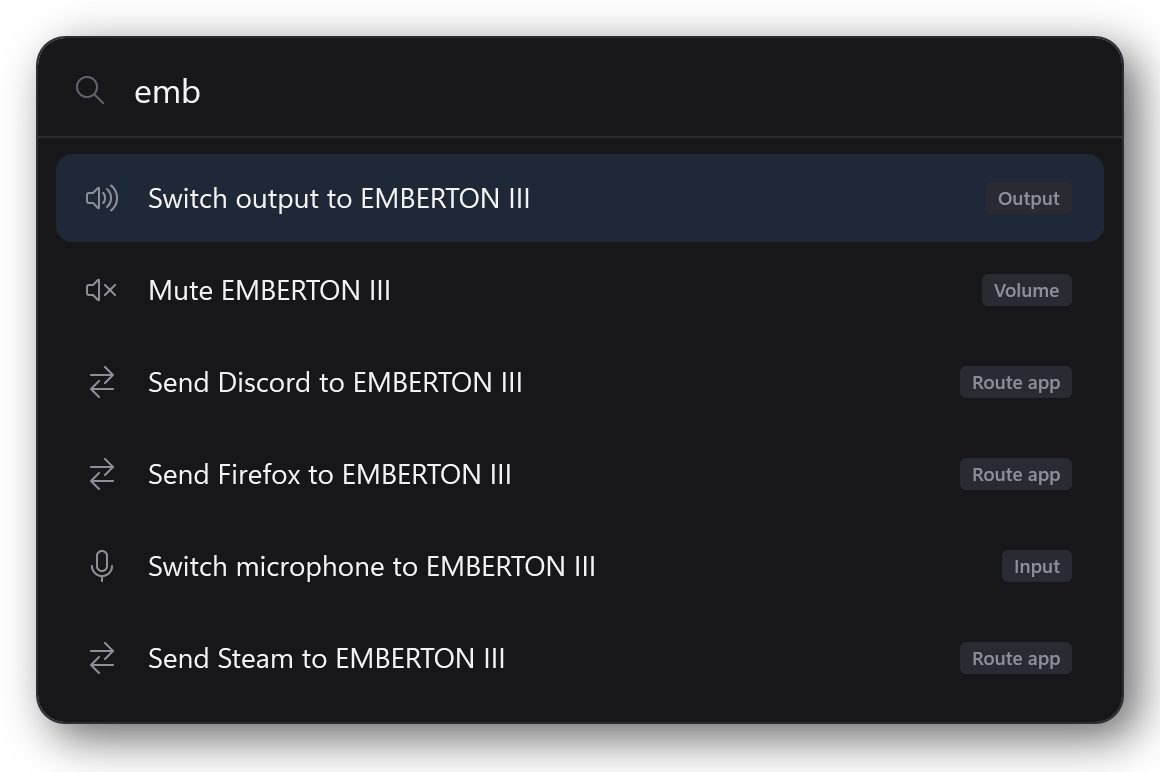
Using it
- Ctrl+Alt+S opens it. Pressing it again closes it.
- Type to filter. You don't need whole words — "emb" finds EMBERTON III.
- ↑ / ↓ move through the results.
- Enter runs the highlighted one.
- Escape, or clicking elsewhere, closes it.
What you can search for
- Devices — switch output, switch microphone, mute
- Apps — send a running app to a device
- Profiles — apply one by name
The tag on the right of each row tells you which kind it is, so two results with similar wording never get confused.
It's the better home for per-app routing
Pinning an app in the flyout means finding the app, opening its row, and finding the device. In the palette it's one line of typing. If you route apps often, this is the way to do it — the flyout is the glanceable view, and this is the fast one.
If Ctrl+Alt+S doesn't work
Another program has probably claimed it. Two fixes:
- Right-click the tray icon — Command palette is in the menu, and shows the current shortcut (or "unavailable" if Windows refused it).
- Rebind it to something free.