
Guides / Getting started
Getting started
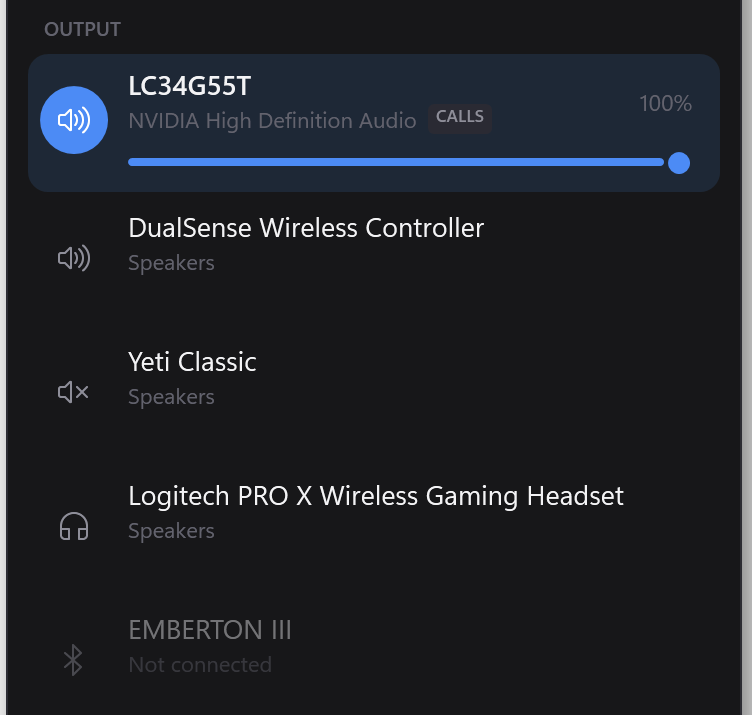
Run the installer, click through the Windows warning, and look for the faders icon in your system tray. Left-click it to open Switchboard.
Installing
- Download the installer and run it.
- Windows will warn you. See below — you'll need to click through it.
- Leave Start Switchboard when I sign in ticked unless you'd rather not.
- It installs and opens. No restart, no account.
It installs into your own user folder and never asks for administrator rights. Nothing it does needs them.
"Windows protected your PC"
You'll see a blue dialog saying Windows prevented an unrecognised app from starting. To continue: click More info, then Run anyway.
That warning means the installer isn't signed with a code-signing certificate, which costs a few hundred dollars a year — this is free software and doesn't have one. It is not a virus scan result and it says nothing about what the program does.
You should be sceptical of downloads that say that, including this one. Rather than asking you to trust it, here are two things you can check: upload the installer to VirusTotal to see what the scanners say, and compare its SHA-256 against the one published in the FAQ to confirm nothing altered the file on its way to you.
One of those scanners flags it as a generic machine-learning detection, and the FAQ explains exactly why — an unsigned installer that unpacks itself to a temp folder looks, structurally, like a dropper.
Finding it
Switchboard has no window of its own. It lives in the notification area, at the right of your taskbar, as two small faders.
- Left-click the icon to open the flyout.
- Right-click it for the menu: Open, Command palette, Start with Windows, Exit.
- Windows often hides new tray icons behind the ^ arrow. Drag it out onto the taskbar to keep it visible.
Starting with Windows
The installer offers this, and you can change your mind any time: right-click the tray icon → Start with Windows. It's a per-user setting and needs no administrator rights.
If you move the installed folder afterwards, tick it again — the shortcut Windows stored points at where the app used to be.
Where to go next
- Switch your audio device — the thing you'll do most.
- Send one app to a different device — Discord and your game, separately.
- The command palette — Ctrl+Alt+S, then just type.
Uninstalling
Settings → Apps → Installed apps → Switchboard → Uninstall.
Your profiles and hotkeys are left behind deliberately, so reinstalling doesn't cost
you them. Delete %APPDATA%\Switchboard if you want them gone too.
If it seems to have vanished
A tray app that hits an error has no window to complain in, so it writes the reason to
%LOCALAPPDATA%\Switchboard\crash.log. Check that first, and paste it into
an email.